This is absolutely AMAZING! Watchmaker support is AWESOME! Thanks a million Eric!
Nov 14, 2017 8:25:32 GMT 1 a7exandroj said:
Hi there, my name is Alex, I came here just to say thank you for your work on this launcher, it works perfectly on DM 368 it's pretty cool. I just have one question, it's there a way to have the back button working different? I mean, when I'm inside any application from play store and I push back button it turns off the screen instead of sending me back to home screen, in this case to the clock itself. Thanks a lot again, I loved your work
check in general thread. the problem was discussed there.
there are several ways to change the key assignment (i used xposed additions)
Nov 15, 2017 20:48:31 GMT 1 kirdim said:
First of all thank you for the great work! I have just installed the app. I do not have a lot of time to read all of the questions and answers here so, Can we choose all watch. files? Locked ones? Where can we easily find unlocked ones? One of the main complaints that I have had with my stock zeblaze thor rom is that there is no way to get rid of the lock symbol when you turn your wrist. Here you can BUT as far as I understand you can have it turned on for no more that 10 seconds. When you reach that number even if you scroll down to find an app to launch it turns off. Really annoying. Am I missing something?
Yes, this bug is back in this version, will be solved in next one if i Can stabilize it…
You can go back to previous version if you need it.
How I can install .watch file protected into the clocksking folder? That watchfaces don’t show expirt/share…
Hi EVERYONE.
I have installed the universal launcher in my zeblaze thor, but I can’t wear in the screen this faces, the files named “watch” don’t run in my smartwatch, what am I doing wrong? thanks
Nov 17, 2017 18:59:37 GMT 1 marcustundan said:
Hi EVERYONE.I have installed the universal launcher in my zeblaze thor, but I can’t wear in the screen this faces, the files named “watch” don’t run in my smartwatch, what am I doing wrong? thanks
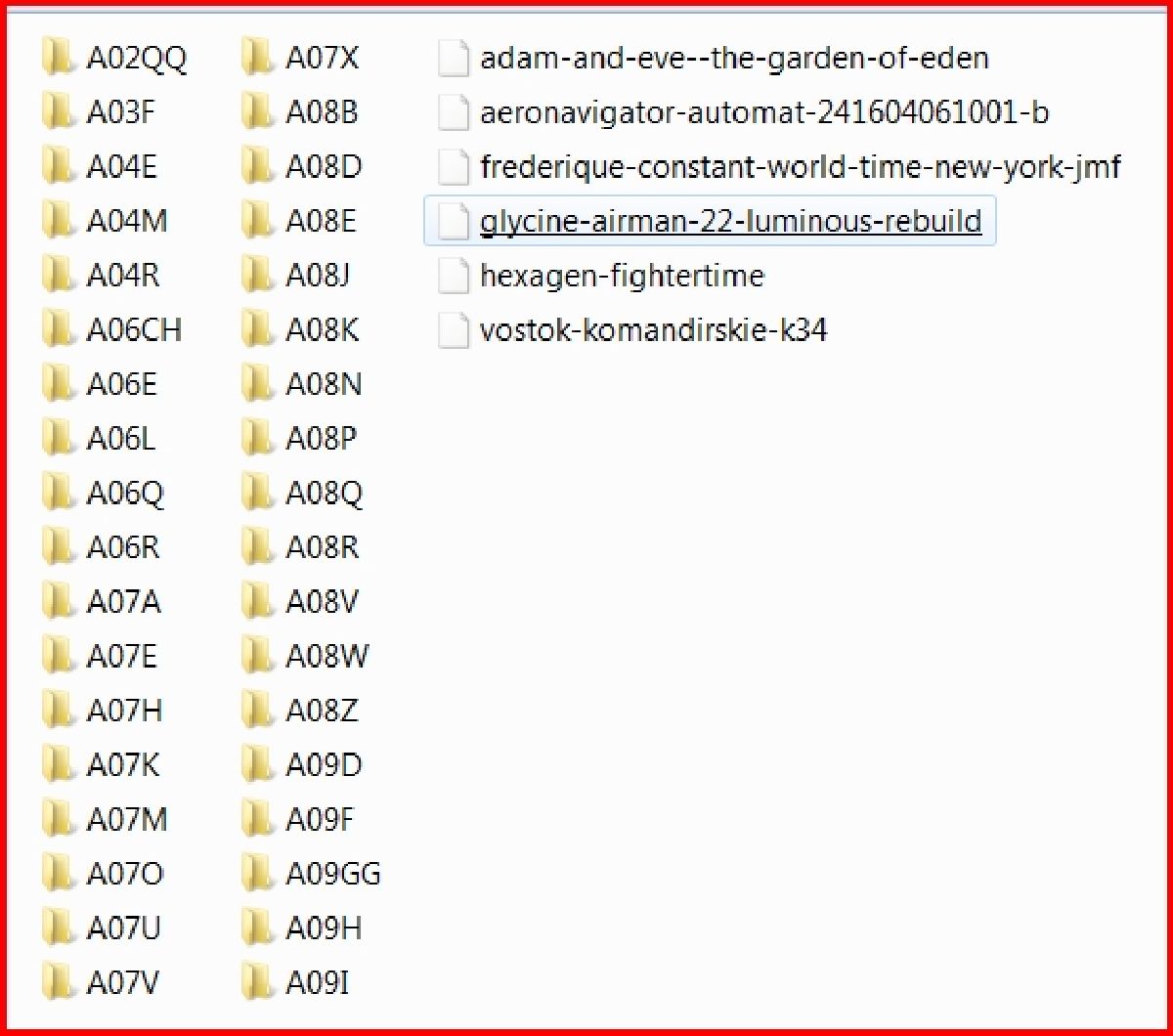
I run them in my Thor. So how did you install the .watch faces on your watch? The way I did it is to place the downloaded “.watch” file into the clockskin folder along with the folders containing the other watchface files. You do not place them in folders.
It looks like this.
Nov 15, 2017 15:30:12 GMT 1 ricktop said:Nov 14, 2017 8:25:32 GMT 1 a7exandroj said:
Hi there, my name is Alex, I came here just to say thank you for your work on this launcher, it works perfectly on DM 368 it's pretty cool. I just have one question, it's there a way to have the back button working different? I mean, when I'm inside any application from play store and I push back button it turns off the screen instead of sending me back to home screen, in this case to the clock itself. Thanks a lot again, I loved your work
Strange, only HOME button will do that, the back button works normally (at least on my watches)... So, no i don't think i can do anything...
The thing is that DM368 only has one button, I think it works for both functions back/home. But thanks a lot
Hello Eric thanks for the launcher. I own a Lem5 and the current one runs very stable. But, searching this board, I did not find any post rising the question how to use the heart rate program with your launcher. There is a widget for pedometer (unfortunately assigned with a heart  ) but non for heartrate.
How do the other ones with Lem5 access the Heartrate. Interestingly, the Watchface I currently use displays the last Heartrate measured (some month ago).
Are there suggestions. This is the last lack for the launcher.
Hello Eric! First of all thank you for your great job! is there a way to enable your launcher but keeping the app carousel in allcall w1? Thanks
Hello Eric. I installed 2.3.5 and unistalled it due to the problem of turning the screen off as I mentioned. I installed 2.3.4 a week ago. Everything worked fine. I loved it but there is a great battery drainage.For example 9 a.m. my thor had 99%. At 1 p.m. 90% and then at 3 p.m. 2% !!! and the thor went off. I have unsistalled the launcher. Did other users suffer from similar problems? Can you fix it somehow?
Thank you
Works good on my qw09 is FunOS.
Nov 21, 2017 15:03:13 GMT 1 kirdim said:
Hello Eric. I installed 2.3.5 and unistalled it due to the problem of turning the screen off as I mentioned. I installed 2.3.4 a week ago. Everything worked fine. I loved it but there is a great battery drainage.For example 9 a.m. my thor had 99%. At 1 p.m. 90% and then at 3 p.m. 2% !!! and the thor went off. I have unsistalled the launcher. Did other users suffer from similar problems? Can you fix it somehow? Thank you
It might be helpful for you to read my posts about my battery problem and the tests I ran with my Zeblaze Thor. It was doing basically the same thing but had nothing to do with Eric's launcher being installed.
Nov 20, 2017 18:33:58 GMT 1 davefraud said:
Hello Eric! First of all thank you for your great job! is there a way to enable your launcher but keeping the app carousel in allcall w1? Thanks
Not possible until i implement it in my launcher...
hi,
i have a lemfo lem3 Z9 YFZ V09 watch and i did it wrong, when i installed the app.
Now i can not go back and not forwards. i saw afterwards in the video, which way was the right one,.
must i set the firmware onto the beginning position or can i do anything else to get the watchfaces?
great work thanks for you
Nov 21, 2017 22:12:52 GMT 1 tommix said:
hi,i have a lemfo lem3 Z9 YFZ V09 watch and i did it wrong, when i installed the app.
Now i can not go back and not forwards. i saw afterwards in the video, which way was the right one,.must i set the firmware onto the beginning position or can i do anything else to get the watchfaces?
I don’t understand what is wrong, but you can uninstall using the uninstall button and install again.
Nov 21, 2017 15:20:28 GMT 1 capt jon said:Nov 21, 2017 15:03:13 GMT 1 kirdim said:
Hello Eric. I installed 2.3.5 and unistalled it due to the problem of turning the screen off as I mentioned. I installed 2.3.4 a week ago. Everything worked fine. I loved it but there is a great battery drainage.For example 9 a.m. my thor had 99%. At 1 p.m. 90% and then at 3 p.m. 2% !!! and the thor went off. I have unsistalled the launcher. Did other users suffer from similar problems? Can you fix it somehow? Thank you
It might be helpful for you to read my posts about my battery problem and the tests I ran with my Zeblaze Thor. It was doing basically the same thing but had nothing to do with Eric's launcher being installed./thread/1404/thor-batt-drops-after-test
Thank you. I read it in the past. The problem is that this drop in energy power happened only while using eric’s launcher. When I use the original one my watch always make it all day. I use it only to watch the time. Also in general the battery indicator isn’t precise since for 2 to 3 hours for instance goes from 100 to 95 and suddenly to 71. It goes in 3 hours to 66 and then 40 for instance. Weird things… All in all it lasts more or less 18 hours with airplane mode on
Nov 22, 2017 7:48:47 GMT 1 ricktop said:Nov 21, 2017 22:12:52 GMT 1 tommix said:
hi,i have a lemfo lem3 Z9 YFZ V09 watch and i did it wrong, when i installed the app.
Now i can not go back and not forwards. i saw afterwards in the video, which way was the right one,.must i set the firmware onto the beginning position or can i do anything else to get the watchfaces?
I don’t understand what is wrong, but you can uninstall using the uninstall button and install again.
I choosed the wrong options, after open the app at the first time. Now i get a blinking watch, when i open the app. when i go forward, the menu comes again, but witch another look. Its in a dobble row, to scroll downstairs and its hard on the right side, so that i dont see a part of the right row. (sorry of mistakes in the language)
downstairs i have another button of the app.
If i push it, there only comes “bright mode” ithe the scaling value and so on.
I can not uninstall.
I remeber, that the installing routine asked me after admin rights or something.
If i try to install from the optionmenu of the clock, the button of uninstalling is grey. not possible to push.
I tried also, the uninstalling about the googleplay.
no chance.
It tells me, that there is a administrationadvice or something, i had to uninstall or denie, before uninstalling…
I think i know my fault, but i cannot correct it…
Try to stop the running app, then try to uninstall it.
Nov 22, 2017 9:27:04 GMT 1 tommix said:Nov 22, 2017 7:48:47 GMT 1 ricktop said:
I don't understand what is wrong, but you can uninstall using the uninstall button and install again.
I choosed the wrong options, after open the app at the first time. Now i get a blinking watch, when i open the app. when i go forward, the menu comes again, but witch another look. Its in a dobble row, to scroll downstairs and its hard on the right side, so that i dont see a part of the right row. (sorry of mistakes in the language)downstairs i have another button of the app.
If i push it, there only comes “bright mode” ithe the scaling value and so on.I can not uninstall.
I remeber, that the installing routine asked me after admin rights or something.
If i try to install from the optionmenu of the clock, the button of uninstalling is grey. not possible to push.
I tried also, the uninstalling about the googleplay.
no chance.
It tells me, that there is a administrationadvice or something, i had to uninstall or denie, before uninstalling…I think i know my fault, but i cannot correct it…
Have you activated the square zoom mode of your watch ? if yes, then disable it.