Nov 22, 2017 9:27:04 GMT 1tommix said: I choosed the wrong options, after open the app at the first time. Now i get a blinking watch, when i open the app. when i go forward, the menu comes again, but witch another look. Its in a dobble row, to scroll downstairs and its hard on the right side, so that i dont see a part of the right row. (sorry of mistakes in the language)
downstairs i have another button of the app.
If i push it, there only comes “bright mode” ithe the scaling value and so on.
I can not uninstall.
I remeber, that the installing routine asked me after admin rights or something.
If i try to install from the optionmenu of the clock, the button of uninstalling is grey. not possible to push.
I tried also, the uninstalling about the googleplay.
no chance.
It tells me, that there is a administrationadvice or something, i had to uninstall or denie, before uninstalling…
I think i know my fault, but i cannot correct it…
Have you activated the square zoom mode of your watch ? if yes, then disable it.
Ok, but what now?
If the square zoom mode is the one, i control about the buttonpressure from the right silver pushbutton, i disabeld it .
the result is, that the displayview is correct and not is turning to the right side.
But how get i the app, that it works correct? my display stay black , if i start the app.
Nov 22, 2017 9:27:04 GMT 1tommix said: I choosed the wrong options, after open the app at the first time. Now i get a blinking watch, when i open the app. when i go forward, the menu comes again, but witch another look. Its in a dobble row, to scroll downstairs and its hard on the right side, so that i dont see a part of the right row. (sorry of mistakes in the language)
downstairs i have another button of the app.
If i push it, there only comes “bright mode” ithe the scaling value and so on.
I can not uninstall.
I remeber, that the installing routine asked me after admin rights or something.
If i try to install from the optionmenu of the clock, the button of uninstalling is grey. not possible to push.
I tried also, the uninstalling about the googleplay.
no chance.
It tells me, that there is a administrationadvice or something, i had to uninstall or denie, before uninstalling…
I think i know my fault, but i cannot correct it…
Have you activated the square zoom mode of your watch ? if yes, then disable it.
I have installed everything like in the video.
But maybe, the video shows another watch.
Its a little bit different by the point notification access.
This menu wont come to my installingprocedure.
Now i have the app so far.
And i saved some .watch - ending watchfaces under “my favorites” at the watch.
But how i work with this watchfaces i dont see.
I saw in one video, that the watch couldnt work with this ending but what shall i do now.?
Nov 23, 2017 13:04:49 GMT 1tommix said: I have installed everything like in the video.
But maybe, the video shows another watch.
Its a little bit different by the point notification access.
This menu wont come to my installingprocedure.
Now i have the app so far.
And i saved some .watch - ending watchfaces under “my favorites” at the watch.
But how i work with this watchfaces i dont see.
I saw in one video, that the watch couldnt work with this ending but what shall i do now.?
Have you watch the install skin video on our YT channel ? Are they on the clockskin directory ?
Nov 23, 2017 13:04:49 GMT 1tommix said: I have installed everything like in the video.
But maybe, the video shows another watch.
Its a little bit different by the point notification access.
This menu wont come to my installingprocedure.
Now i have the app so far.
And i saved some .watch - ending watchfaces under “my favorites” at the watch.
But how i work with this watchfaces i dont see.
I saw in one video, that the watch couldnt work with this ending but what shall i do now.?
It is not real clear but you may be not installing the files correctly. How you are using the "my favorites" folder is not clear in your explanation. You do not put the ".watch" watchface files into a separate folder inside the "clockskin" folder. They need to go into the "clockskin" folder each .watch file by itself.
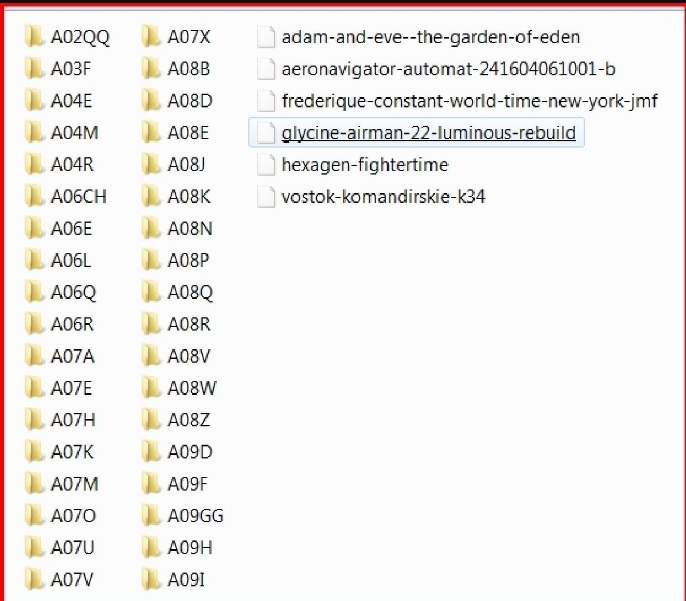
It should look similar to the picture shown with the .watch files listed by themselves in the "clockskin" folder. Installing the ".watch" files this way has always worked for me in, several different watches.
(Not to confuse you the other lettered folders shown in my “clockskin” folder are how I store my watchface files so I can display them in a specific order if I want to, by changing the letters and realigning the order in which they display.)
Just bought DM368 and immediately installed SW Launcher then tried a watchface. WatchFace works but it is off the center, flushed to the lower right of the screen
tried to install ClockSkinCoCo as well. but same results. How do I put that watchface in the center where it should belong. Help please…
Do you really expect someone here to help you with so little info?
What model watch do you have? Which watchface is causing you the problem? What exactly is the problem with the {dmot} function that you’re experiencing? What version of the launcher are you using? Do you have any log files? Can you provide a download link to the offending watchface so that we can try to recreate the problem?
If you can’t provide some useful info, don’t expect anyone to help you.
Ricktop I have a quick question. Is it possible, that with your launcher some parts of the screen are not working? I found on my Q7 the part at 12 is not working if I’m using the launcher. With the original one there is no problem.
I tested it with the file manager, if I’m using your launcher the return button at 12 is not working, if I’m using the standard launcher if works fine.
Nov 28, 2017 10:32:58 GMT 1hans65 said: Ricktop I have a quick question. Is it possible, that with your launcher some parts of the screen are not working? I found on my Q7 the part at 12 is not working if I’m using the launcher. With the original one there is no problem.
I tested it with the file manager, if I’m using your launcher the return button at 12 is not working, if I’m using the standard launcher if works fine.
Yes that’s a known issue, normally impossible, so i don’t know from what it can Come… Those watch Android version are so strange…
Hello Ricktop in the version of Universal launcher New Gen 2.4.1 has some errors for example you can not open the watch droid assistant from the application menu and in some .watch files there is no sound. Any suggestions?
Nov 29, 2017 6:39:22 GMT 1jaeson said: Hello Ricktop in the version of Universal launcher New Gen 2.4.1 has some errors for example you can not open the watch droid assistant from the application menu and in some .watch files there is no sound. Any suggestions?
Hmm, i am having the same problem.
Finow X5 Air -170919
Oh and before i forget…
Awesome work on the launcher, Ricktop! I am having a blast with the new look and posibilities.
Nov 28, 2017 10:32:58 GMT 1hans65 said: Ricktop I have a quick question. Is it possible, that with your launcher some parts of the screen are not working? I found on my Q7 the part at 12 is not working if I’m using the launcher. With the original one there is no problem.
I tested it with the file manager, if I’m using your launcher the return button at 12 is not working, if I’m using the standard launcher if works fine.
Yes that’s a known issue, normally impossible, so i don’t know from what it can Come… Those watch Android version are so strange…
How do we (No Gapps) get v2.4.1 update on our watches