daveth: I use the squarer zoom function on my watch it I can’t see all the function of an app. Sometimes I can’t see the settings, if I use it in normal mode. If I change it to square, I see everything and can change settings.
Hey Eric i’ve tested your new version, last version i tested was the beta with the Dpi option (my watch is 120 dpi).
In that version i could see full icons and partial icon text in menu, but then it entered like in a black screen loop that i never can get out of it, then it runned out of battery and it won’t turn on again so i flashed a different firmware (had no backup of mine) and killed my watch because it was obv XD
In your new version(platstore ver.), i see full icons and texts and it seems smoother changuing through menus but i don’t know why in a few minutes do the black screen thing again, making impossible to do nothing.
It starts like the screen turns off suddenly when i open an apk or i enter in menu, then i unlock and i see the clock and nex time i unlock i only see a black screen like trying to turn on but it cant get out of it, i reboot and it seems it needs less time than before to crush again. now trying to unistall but i can’t either cause i get a black screen before arriving to the 3rd screen in upper menu xD
It’s strange but i think the launcher just doesn’t fit in the chinese software i have or something.
My model watch: GW05, 4.4.2, 240x240 screen.
Stock launcher it’s FunOs
Oct 14, 2017 16:39:13 GMT 1 ricktop said:Oct 14, 2017 14:52:55 GMT 1 daveth said:
Ricktop, It's a real great launcher you made, and I made you a donation to you for the good job!Can you explain to me what the buttons in the menu (when you scrol up from the clock face and then the 3e screen) the button next to DPI, if I click on it the text says Default or Zoom?
What ever I select nothing happens?
Thanks for donation.This menu is for square zoom or normal. It only works on some finow i think.
I also think that's the case, on a Lemfo LES1 it won't do anything, I can activate sqaure zoom by the default laucher but then your universal launcher is out of center.
Oct 15, 2017 1:54:53 GMT 1 albayeah said:
Hey Eric i've tested your new version, last version i tested was the beta with the Dpi option (my watch is 120 dpi). In that version i could see full icons and partial icon text in menu, but then it entered like in a black screen loop that i never can get out of it, then it runned out of battery and it won't turn on again so i flashed a different firmware (had no backup of mine) and killed my watch because it was obv XDIn your new version(platstore ver.), i see full icons and texts and it seems smoother changuing through menus but i don’t know why in a few minutes do the black screen thing again, making impossible to do nothing.
It starts like the screen turns off suddenly when i open an apk or i enter in menu, then i unlock and i see the clock and nex time i unlock i only see a black screen like trying to turn on but it cant get out of it, i reboot and it seems it needs less time than before to crush again. now trying to unistall but i can’t either cause i get a black screen before arriving to the 3rd screen in upper menu xD
It’s strange but i think the launcher just doesn’t fit in the chinese software i have or something.My model watch: GW05, 4.4.2, 240x240 screen.
Stock launcher it’s FunOs
Sad to hear that. Probably funos is not doing as Android would do. If you can’t uninstall, maybe you can reach the setting reset to factory button. If you have the log file on the memory Root, you can share it. Maybe i Can find something.
If you have adb installed on your PC, you can probably get some useful informations on this and even uninstall my app…
Just a request for a future version, can you make it possible to re arrange the widgets which are made?
Sometimes I want I activate a new widget, I want that widget in front in the line of widgets.
Now I have to delete them all and re activate them to have them at the right order.
I also found a bug, sometimes when I change some configurations (in the screens when you scroll up) I can’t scroll down anymore (to the watch face), only when I push on a button on the side of the watch (so that the watch is out) and then reactivate the watch again, after that every thing works ok.
Oct 14, 2017 16:40:11 GMT 1 ricktop said:Oct 14, 2017 12:49:27 GMT 1 ernst said:
Hello Eric,some People have Problems with your launcher on the Finow x5 air, i have some of this Problems, the first big Problem ist the launcher is not in the Center, the round or square opption in the Settings on the watch have no effect, it is impossible to uninstall the launche you have no Change to find the buttons.
Maybe it is a Problem on the Firmware, the Firmware on the Finow x5 air ist 170825-1503662607.
thanks
I use the launcher every day on my X5 Air, never seen this centering problem... To uninstall, click the uninstall button of the launcher 3rd setting screen.
Hi Rick . I have the same problem on my X5 Air ? I will fidlde about with settings
Oct 12, 2017 10:28:46 GMT 1 mtibee said:
Am I the only one who has trouble with the notifications? (Only the watchface appears when the watch (DM368) gets a notification.)
You're not the only one, me too with my DM368. Running watch droid now for notifications. It is the only thing in the launcher I'm not happy with.
Oct 15, 2017 19:08:42 GMT 1 Tim And Pierce Collins said:Oct 14, 2017 16:40:11 GMT 1 ricktop said:
I use the launcher every day on my X5 Air, never seen this centering problem... To uninstall, click the uninstall button of the launcher 3rd setting screen.
Hi Rick . I have the same problem on my X5 Air ? I will fidlde about wi,,th settings
Hello,
after reset my Finow x5 air i set the Display to squar mode and install the universal launcher, after reboot i set the normal mode and Change the dpi, after a new reboot the launcher works without any Problems. Maybe it can help you.
2.3.4 version published :
- corrected Clocksin 24H hand movement
- corrected Watchmaker counter for decimal or negative values
- corrected pedometer values (need to wait for next day to see it right, or you can manually change the date to force refresh)
Oct 18, 2017 8:39:13 GMT 1 ricktop said:
2.3.4 version published : - corrected Clocksin 24H hand movement - corrected Watchmaker counter for decimal or negative values - corrected pedometer values (need to wait for next day to see it right, or you can manually change the date to force refresh)Thank You, will we see it on the first page?
Oct 18, 2017 8:39:13 GMT 1 ricktop said:
2.3.4 version published : - corrected Clocksin 24H hand movement - corrected Watchmaker counter for decimal or negative values - corrected pedometer values (need to wait for next day to see it right, or you can manually change the date to force refresh)
Thanks for the update.
I found two bugs in this version and in the previous version, sometimes after restarting the watch some of the widget are gone, on the place where the widgets have been is now a black screen with a small white circle in the midle.
Also a lot of time after making a widget I can scroll back up any more to my clockskin, after pusshing the button on the watch and reactivate everything is working ok again.
Step counter working fine here again. Thank You
Oct 16, 2017 17:34:36 GMT 1 ernst said:Oct 15, 2017 19:08:42 GMT 1 Tim And Pierce Collins said:
Hi Rick . I have the same problem on my X5 Air ? I will fidlde about wi,,th settingsHello,
after reset my Finow x5 air i set the Display to squar mode and install the universal launcher, after reboot i set the normal mode and Change the dpi, after a new reboot the launcher works without any Problems. Maybe it can help you.
Hello,
i double-tap the watch face an i get this Settings
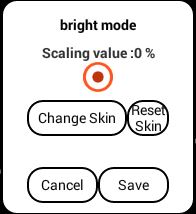
wipe left, up, down and right have no effect, there can i find this Screen
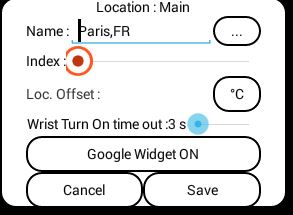
then i start the Erics launcher in the apps on my watch there cames only the watchface.
What do i wrong?
But anyway Eric you have made a great Job, many thanks that we can use watchfaces in the Clokskinmaker Format.
Oct 18, 2017 8:39:13 GMT 1 ricktop said:
2.3.4 version published : - corrected Clocksin 24H hand movement - corrected Watchmaker counter for decimal or negative values - corrected pedometer values (need to wait for next day to see it right, or you can manually change the date to force refresh)
Hi Rik congratulations on getting the app onto google playstore. For some reason with the new version on my DM368 the hand bright option no longer works 
Oct 18, 2017 21:50:32 GMT 1 ernst said:Oct 16, 2017 17:34:36 GMT 1 ernst said:Hello,
after reset my Finow x5 air i set the Display to squar mode and install the universal launcher, after reboot i set the normal mode and Change the dpi, after a new reboot the launcher works without any Problems. Maybe it can help you.
Hello,
i double-tap the watch face an i get this Settings
wipe left, up, down and right have no effect, there can i find this Screen
then i start the Erics launcher in the apps on my watch there cames only the watchface.
What do i wrong?
But anyway Eric you have made a great Job, many thanks that we can use watchfaces in the Clokskinmaker Format.
Skin prefs in 3rd setting screen…
Oct 19, 2017 6:29:37 GMT 1 gdisckaraoke said:
For some reason with the new version on my DM368 the hand bright option no longer works ☹️
And pedometer works? If not try restarting watch. Sometimes sensors get stuck and only way out of this is to restart it. Sometimes couple of times. Seems like a kernel bug cause I only seen it on earlier firmware versions
Oct 19, 2017 7:17:57 GMT 1 nameless said:
Oct 19, 2017 6:29:37 GMT 1 gdisckaraoke said:
For some reason with the new version on my DM368 the hand bright option no longer works ☹️
And pedometer works? If not try restarting watch. Sometimes sensors get stuck and only way out of this is to restart it. Sometimes couple of times. Seems like a kernel bug cause I only seen it on earlier firmware versions
Same problem here with the pedometer, I shutdown my watch every night and restart it it in the morning and then the pedometer still adds the amount from the day before. I don't think it's a kernel bug because this only happens with this universal launcher from Ricktop, It's just a bug in the launcher.
Oct 19, 2017 8:48:08 GMT 1 daveth said:Oct 19, 2017 7:17:57 GMT 1 nameless said:
And pedometer works? If not try restarting watch. Sometimes sensors get stuck and only way out of this is to restart it. Sometimes couple of times. Seems like a kernel bug cause I only seen it on earlier firmware versions
Same problem here with the pedometer, I shutdown my watch every night and restart it it in the morning and then the pedometer still adds the amount from the day before. I don't think it's a kernel bug because this only happens with this universal launcher from Ricktop, It's just a bug in the launcher.
It's not a general bug, it's only on your watch... Which is ?
Oct 19, 2017 11:07:37 GMT 1 ricktop said:Oct 19, 2017 8:48:08 GMT 1 daveth said:
Same problem here with the pedometer, I shutdown my watch every night and restart it it in the morning and then the pedometer still adds the amount from the day before. I don't think it's a kernel bug because this only happens with this universal launcher from Ricktop, It's just a bug in the launcher.
It's not a general bug, it's only on your watch... Which is ?
It's a Lemfo Les1, the healt app on the watch give the ammount right but if I use a .watch skin with a pedometer on it adds the ammount from the previous day. It looks like if the watch is shutdown and the date changes the pedometer option wont reset to zero if the watch is restarted. Also a older version of the launcher doesn't have this problem, so it's still looks like a bug in the launcher.
Have you seen the other bug report? I post it on this tread about widgets that disappear?
Oct 18, 2017 8:39:13 GMT 1 ricktop said:
2.3.4 version published : - corrected Clocksin 24H hand movement - corrected Watchmaker counter for decimal or negative values - corrected pedometer values (need to wait for next day to see it right, or you can manually change the date to force refresh)
Hi Ricktop in update 2.3.4 again fail some ASMODAY watchfaces (Venom)