After having placed a SIM card in my H2, I checked a few days after, that the Communications Operator is charging me 2€ of Daily Internet, even without me accessing the internet.
Do Apps consume mobile data in the background, without my knowledge?
I use the clock for three months, all these 3 months in a clock installed SIM card. And never for all these three months, the operator did not charge me for using mobile data (mobile Internet), if they were disabled on the clock.
I think your problem is not in the work of mobile data in the background, but maybe in some application on the clock that you yourself installed, and which may charge a fee, in secret from you.
After having placed a SIM card in my H2, I checked a few days after, that the Communications Operator is charging me 2€ of Daily Internet, even without me accessing the internet.
Do Apps consume mobile data in the background, without my knowledge?
I use the clock for three months, all these 3 months in a clock installed SIM card. And never for all these three months, the operator did not charge me for using mobile data (mobile Internet), if they were disabled on the clock.
I think your problem is not in the work of mobile data in the background, but maybe in some application on the clock that you yourself installed, and which may charge a fee, in secret from you.
If you have the Data ON, even if you are not doing anything per say, some of the apps like google play store could being periodically checking for updates and using data. Not knowing what apps you have installed others could be doing the same thing or running in the background. If so its best to leave the Data function off unless you actually want to use it to access the internet. Or use an app like Hibernation Manager that you can set to disable selected apps while the watch is asleep.
Apr 3, 2018 12:20:36 GMT 1foto said: I use the clock for three months, all these 3 months in a clock installed SIM card. And never for all these three months, the operator did not charge me for using mobile data (mobile Internet), if they were disabled on the clock.
I think your problem is not in the work of mobile data in the background, but maybe in some application on the clock that you yourself installed, and which may charge a fee, in secret from you.
If you have the Data ON, even if you are not doing anything per say, some of the apps like google play store could being periodically checking for updates and using data. Not knowing what apps you have installed others could be doing the same thing or running in the background. If so its best to leave the Data function off unless you actually want to use it to access the internet. Or use an app like Hibernation Manager that you can set to disable selected apps while the watch is asleep.
Thank you captjon!
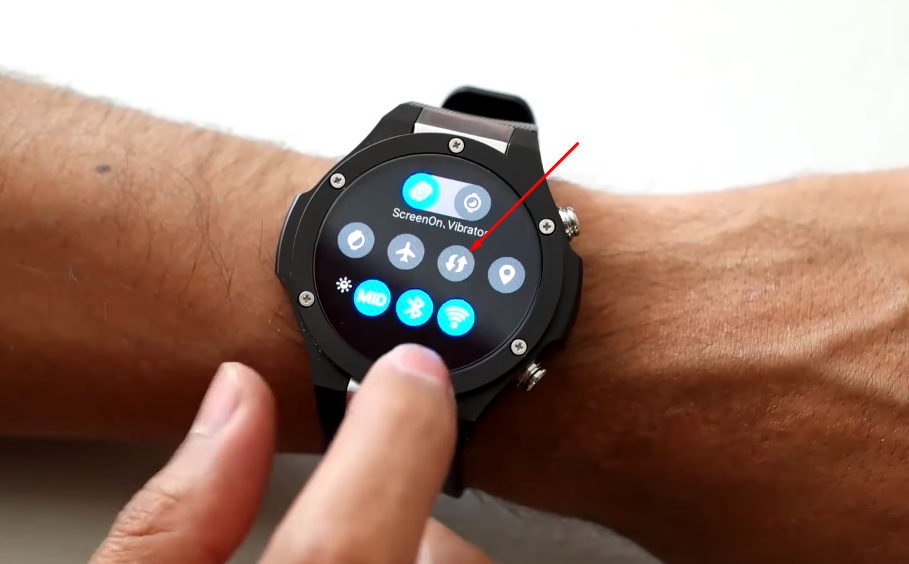
There’s only a question: where is the switch to Data ON/OFF, in the H2? (That is the ideal solution, i think).
But, If i leave the data function off, it only disable the mobile data or the Wi-Fi connection get disable too?
I only want to have the SIM card activated, but only for Calls and SMS, without charging mobile data and, if possible, to use the Wi-Fi connection to acess the internet.
I guess other users of an Android smartwatch that use a SIM card, want to control de mobile data usage too.
To Sonia: Thank you for the alternative link to the app. Gesture Search. My problem is that my H2 is not rooted, so i dont know iif the app. gonna work.
Apr 4, 2018 7:59:47 GMT 1moreira67 said:
There's only a question: where is the switch to Data ON/OFF, in the H2? (That is the ideal solution, i think).
Click this icon, and you will see in the settings - mobile data ON or OFF
Apr 4, 2018 7:59:47 GMT 1moreira67 said: There's only a question: where is the switch to Data ON/OFF, in the H2? (That is the ideal solution, i think).
Click this icon, and you will see in the settings - mobile data ON or OFF
Oh my god, Thanks foto!
You know what I thought this icon was? I thought it was to sync and update app notifications!!
Of course that was what activated the mobile data, because as I thought it had the other function, it was always activated…my fault!