Well it’s obvious the Prime 2 is more exciting to you 
5 Likes
Well don’t know what went on with mine then. I never installed the watch/phone sync program that I originally used on the Prime. I just put all my contacts on my sim card. I abandoned my fondle slab a year ago so had no phone to bluetooth to (my lemfo Lem X and Prime1 haven’t been switched on since I opened the Prime 2 box). I seem to recall being unable to find them and doing a failed sync before doing the sync via google back up or something. I was/am pretty stoned at/all the time…who knows what happened.
Ha ha ha, I think you have answered your own question 
Okay. So dumb question, both watches I’ve had rely on with the WiiWatch 2 App or the WiiWear App but you recommend the WatchDroid instead? I’m all about following recommendations. I don’t have much on my watch yet so a factory reset without losing much is still possible then instead of connecting through WiiWear, go through WatchDroid?
There is a thread on this forum for WatchDroid. The developer is active on this forum. I have used it for years and it works very well for notifications. I prefer to use version 9.0, the last one before Google put a lot of restrictions on the apps, over the current version. Read the forum to help you decide which to use.
7 Likes
@Jonathan_Bickel thanks!
Very nice.
And usefull!
It’s funny the way this app made for Android TV adapts so well to an Android watch even in full circle mode.

Even setting the app to our liking on the Prime 2 works very well

2 Likes
Nice app what it’s name ?
does the Kp2 screen support pinch to zoom in/out and double tap to wake?,can i sideload any android app just like i do on my phone? can you kindly post a screenshot of whatsapp in use? whats the average sot(screen on time) without gaming? and can you mute camera shutter sound?
sorry to annoy you with too many basic questions:)
Pinch to zoom, yes.
Double tap to wake, no. - But there is twist or raise arm to wake.
Yes, you can load any app, but why sideload, you can just get it from Play store.
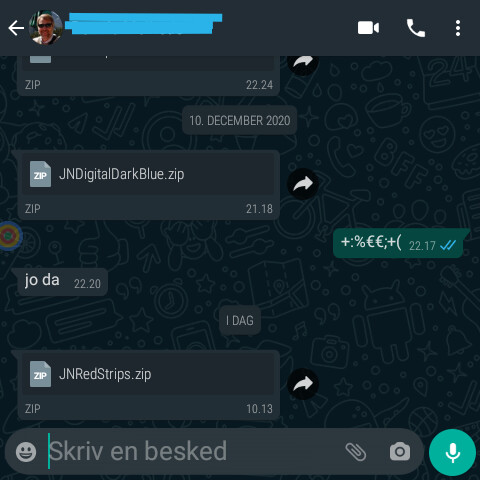
Screenshot is not how you see the app, as it is naturally a round screen, so corners are out of the screen, but you can switch to a smaller square picture, which fits within the round screen.
No idea about sot, but it lasts longer than Prime 1.
If you switch the sound to silent, the Camera doesn’t make any sound.
2 Likes
…just because there are thousands of useful apps you won’t find at the playstore…
2 Likes
thanks a million.
sideloading coz some apps may not be available in my region.
as for whatsapp, the only thing that matters is that whatsapp voice messages are supported so that i can listen and reply thru my wireless earphones paired to kp2.
If it can last for a full day of browsing it,ll be fun and i think the 1600 mah cell can do it.
Voice messages are supported.
1 Like
I highly doubt a full day of ost…
I am on 12% after 14h, not much usage today, so mainly email and chat programs polling and the watchface and tethering via Bluetooth to phone for notifications sync. I have WiFi, SIM and Bluetooth all enabled, and I live in an area where the mobile signal isn’t really reachable indoors, but the watch will try the whole day. (On my Prime 1 I couldn’t get through a day with SIM enabled in this area, actually not even WiFi, so I scheduled WiFi on/off with Macrodroid, to receive notifications now and then, and SIM was always off)
2 Likes
It’s ATV Launcher, originally for Android TV.
1 Like
so can i assume that its gsm and 3g/4g signal reception is reliable and that its 1600 mah battery takes about 2 hours to charge ?
by the way whats the android security patch on ur kp2? october 2020 may be??
Security update from April 5 2020.
I don’t see the charging time. I switch off the watch and charge it over night.
Because of the area I live in, I am not the chosen one to evaluate mobile signal reliability. My watch is mostly not connected, but it is normal here.
1 Like
Some days ago I talked of an alternative keyboard for the Prime 2, Microsoft SwiftKey.
I use it on my smartphones and my Prime 2.
Best features are :
It uses your typing to learn your vocabulary and it is VERY efficient to predict what your begin typing.
It’s incredible the number of taps you save compared with other keyboards.
And, of course, when you install it on a new device it remembers everything it has learned so far!
It offers a very large variety of themes to fit everybody’s use.
It is resizable and higly configurable on every setting you could imagine.
So why do I come back with it in this new post?
I used Microsoft SwiftKey keyboard on my Prime 2 for the qualities I cited but essentially because it is resizable and it correctly pushes the editfield over the keyboard. (For me the original keyboard fills 90% of the Prime 2 screen and hides the editfield especially for passwords fields!)
Today I discovered two well hidden features :
SwiftKey keyboard can float over the app you’re using and you can move it up, down, left, rigth if a key is to close to a border or you want to see more of the underlying app.

It also offers a way to easily move the cursor in your text. Usually I have four keys dedicated to the cursor motion but today I discovered that I can get rid of them.
If your press and hold the space bar your screen becomes a pad, you move your finger and the cursor follows the same motion in your text.
Especially usefull on a watch screen!
I also discovered that recording your text with the dedicated key works very well and in the language your typing.
Voilà, I hope this can help some of you and if you need some help you can ask…
3 Likes
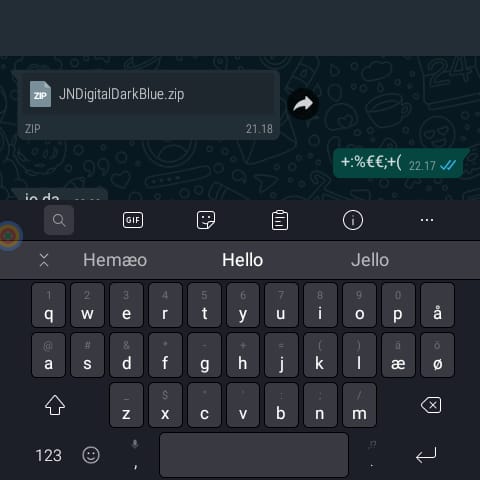
For me, e.g. in WhatsApp, the text input field stays in the bottom of the screen, and the SwiftKey Keyboard overlays it so I can’t see what I type