Hello, just to say that none of this watch can’t have a good battery life for a day ( 8h with sim card installed ), for a day you have to charge it 2 or 3 times !
So they are practically useless…
With they 350 mha battery it’s impossible to have a correct use on this watchphone !
No matter what you do to correct that : installing apk ( battery calibration, battery repair, etc… are fake apk ) and changing google play service version doesnt change anything for this problem…
i think that a 600 mha battery is a minimum to have a correct use on this watchphone. That’s all.
As a last straw you may try rooting and lowering the cpu clock frequency and try hibernation manager, it did increase my watch battery life although i dont use sim card in my watch.
Watchphone is properly rooted and even with hibernation manager the problem is the same…
Oct 4, 2017 16:58:33 GMT 1 kiki301 said:
Watchphone is properly rooted and even with hibernation manager the problem is the same...
if you have root install wakelock detector and see what drains the battery, how did you root the watch?
I have rooted it with KinRoot ( pc version ).
Oct 5, 2017 6:21:56 GMT 1 kiki301 said:
I have rooted it with KinRoot ( pc version ).
THAT thing (kingroot) really drains the battery, kingroot is one of the worst way to root the watch, if you install wakelock detector you'll see that it wakes up your watch so many times and for what??? my suggetion is to replace it with supersu.
***read the suggestions of seb84 to help remove it: /thread/1536/s1-smart-watch?page=9
Yes, you’r absolutly right ! I have removed Kingroot and now it’s better, at half of the day still 50 % of battery. Thanks.
Oct 6, 2017 15:33:05 GMT 1 kiki301 said:
Yes, you'r absolutly right ! I have removed Kingroot and now it's better, at half of the day still 50 % of battery. Thanks.
HOW did you remove it??? i had no luck even with the great apps that seb84 gave me.
sonia i also used kingroot at first to root my watch cuz no recovery existed specially for my watch. so i used this link forum.xda-developers.com/a310/general/how-to-remove-replace-kingroot-kinguser-t3308989. as you already have root so it will work hopefully.
Another link www.w0lfdroid.com/2015/05/How-to-Remove-Replace-KingUser-KingRoot-with-SuperSU.html
I have removed it with Lucky Patcher…
Oct 4, 2017 17:29:22 GMT 1 soniasophie9697 said:
Oct 4, 2017 16:58:33 GMT 1 kiki301 said:
Watchphone is properly rooted and even with hibernation manager the problem is the same…
if you have root install wakelock detector and see what drains the battery, how did you root the watch?
Is there a way/app there can analyze the battery usage on a none rooted watch ?
I don´t know what of the following app which is eating my battery:
"Double tap" - play.google.com/store/apps/details?id=com.vantinh.doubletapscontrol
"Watch droid assistant" - play.google.com/store/apps/details?id=com.lumaticsoft.watchdroidassistant
"Bluetooth tethering manager" - play.google.com/store/apps/details?id=com.tomlocksapps.bluetoothtetheringmanager
/Kent
Oct 10, 2017 14:02:11 GMT 1 kent2017 said:Oct 4, 2017 17:29:22 GMT 1 soniasophie9697 said:
if you have root install wakelock detector and see what drains the battery, how did you root the watch?Is there a way/app there can analyze the battery usage on a none rooted watch ?
I don´t know what of the following app which is eating my battery:
"Double tap" - play.google.com/store/apps/details?id=com.vantinh.doubletapscontrol
"Watch droid assistant" - play.google.com/store/apps/details?id=com.lumaticsoft.watchdroidassistant
"Bluetooth tethering manager" - play.google.com/store/apps/details?id=com.tomlocksapps.bluetoothtetheringmanager
/Kent
not really, wakelock detector can show you which app awakening the watch many times and there is'nt an app which does that without root. the first one 100% battery drainer, watch droid light up the screen so that also has an impact on battery the app itself does'nt really impact battery usage, the last one do'nt know about.
Oct 10, 2017 14:39:38 GMT 1 soniasophie9697 said:
Oct 10, 2017 14:02:11 GMT 1 kent2017 said:Is there a way/app there can analyze the battery usage on a none rooted watch ?
I don´t know what of the following app which is eating my battery:
"Double tap" - play.google.com/store/apps/details?id=com.vantinh.doubletapscontrol
"Watch droid assistant" - play.google.com/store/apps/details?id=com.lumaticsoft.watchdroidassistant
"Bluetooth tethering manager" - play.google.com/store/apps/details?id=com.tomlocksapps.bluetoothtetheringmanager
/Kent
not really, wakelock detector can show you which app awakening the watch many times and there is'nt an app which does that without root. the first one 100% battery drainer, watch droid light up the screen so that also has an impact on battery the app itself does'nt really impact battery usage, the last one do'nt know about.
rooting seems to be easy with kingroot, but it seems not be to recommended.
Is there any other "plug and play"/easy root solutions that can be recommended ?
Oct 10, 2017 17:19:56 GMT 1 kent2017 said:Oct 10, 2017 14:39:38 GMT 1 soniasophie9697 said:
not really, wakelock detector can show you which app awakening the watch many times and there is’nt an app which does that without root. the first one 100% battery drainer, watch droid light up the screen so that also has an impact on battery the app itself does’nt really impact battery usage, the last one do’nt know about.rooting seems to be easy with kingroot, but it seems not be to recommended.
Is there any other “plug and play”/easy root solutions that can be recommended ?
true, it does it in less than a minute BUT it has great impact on battery life and not easy to remove (been there). i've noticed (just today i started to use Watch Droid used only M2D) today that watch droid does has great impact on battery life and so i went back to m2d which even when it uses 3g it does'nt have great impact on battery so i stay with it, the problem is the watch version does'nt give the option to reply so i am using the tablet version on the watch but it still works great. i hope that the developer will start working on it again and improve the usage.
rooting seems to be easy with kingroot, but it seems not be to recommended…
Effectively Kingroot, Kingoroot or Iroot are very easy programs to root but it’s very important to know this programs
are battery eater and they install some malwares !
I have recently made a test on another of my watchphone with this programs and result : full of malwares and adds…
Be carefull !
I am on stock rom V09 with WiiWatch modification and get up to 18 hours battery life with SIM/3G and BT and WiFi and GPS switched on. BUT this is somehow related to how the LES1 is handled or ‘stored’. I am currently investigating on this.
It seems battery life is excellent when the watch is lying peacefully on the table. And it seems (strange enough) there is no dependency to pedometer service or gesture wake-up settings, though that would seem quite obvious.
AFAIK doze mode was first introduced in Android 6 and the watch is running on Android 5.1. So this drops out as an explanation as well.
Maybe someone can verify battery life in the watch-on-the-table-and-connected setup? (preferably with the WiiWatch mod) I will try to post my battery graph tomorrow.
Best
DrGo
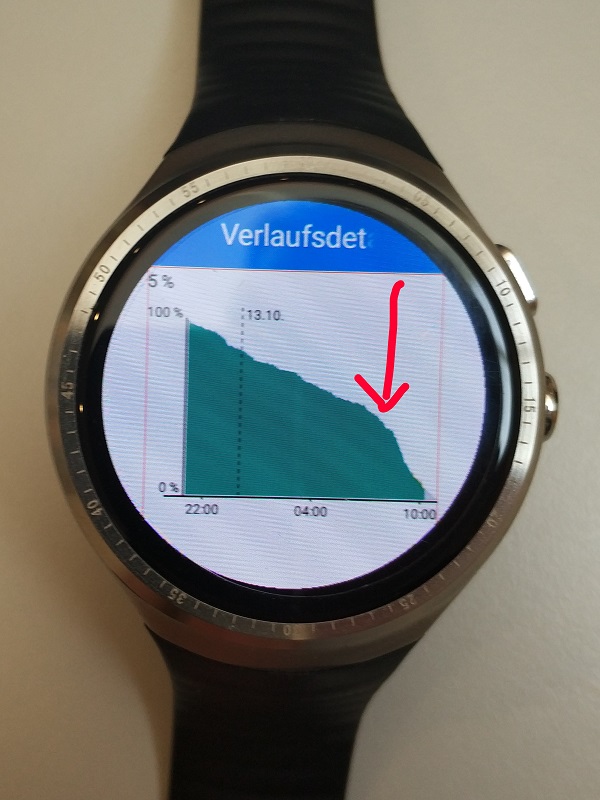
I tested battery life again with my LES1 (and the WiiWatch mod) fully connected. After 11 hours the remaining battery was at 43 %. That equivalents to a total battery runtime of about 19 hours. Sounds really nice, but …
The watch was situated flat and peaceful on a table. As soon as I started wearing the watch, battery consumption increased dramatically. See picture for reference, picking up time is marked with an arrow.
Lights went off about 3 hours later. So battery consumption in fact trippled! This equivalents to the poor 6-7 hour battery life some have reported.
It is important to notice, that I switched off the “lift arm to show watchface” feature and the pedometer service in the gestures menu. I checked the time about 4 times manually but that should not have such an excessive effect.
So, what’s this? My assumption is that the pedometer service and/or the lift-to-show feature switching are badly implemented. Technically speaking those services probably keep running and internally so react but simply do not light up the display or count steps. However, this would wake up CPU and cause extra battery consumption.
Maybe it is possible to deactivate more packages and find out which ones are involved.
I would really like having a 18+ hour battery life with my LES1.
Can someone please double check this beahaviour?
Any other suggestions?
And please use this survey to share your battery life experience! → goo.gl/forms/yS5YpHsBglMq0U912
Takes just a minute!
Best,
DrGo
drgo say : As soon as I started wearing the watch, battery consumption increased dramatically.
This is normal, because the watch is searching for the gsm network connection, on this watch ( and many other too ) the gsm antenna is in the band and
when you wear it she increase the power to maintening the connection…
Our body is practicaly made of water and water absorb the gsm signal. This problem is less with a smartphone or a watchphone who doesnt have the antenna
in the band and so have a better signal reception.
Oct 14, 2017 7:06:11 GMT 1 kiki301 said:kiki301: Yep, good point, that absolutey makes sense.
drgo say : As soon as I started wearing the watch, battery consumption increased dramatically.This is normal, because the watch is searching for the gsm network connection, on this watch ( and many other too ) the gsm antenna is in the band and
when you wear it she increase the power to maintening the connection…
[…]
I will check whether wearing the band tighter or looser also has some effect on battery consumption.
And, if so, disabling GSM/3G should give a siginificant battery life improvement.
I’m curious to see the survey results as well.
Regards,
DrGo
Oct 14, 2017 22:20:40 GMT 1 drgo said:Oct 14, 2017 7:06:11 GMT 1 kiki301 said:kiki301 : Yep, good point, that absolutey makes sense.
drgo say : As soon as I started wearing the watch, battery consumption increased dramatically.This is normal, because the watch is searching for the gsm network connection, on this watch ( and many other too ) the gsm antenna is in the band and
when you wear it she increase the power to maintening the connection…
[…]
I will check whether wearing the band tighter or looser also has some effect on battery consumption.And, if so, disabling GSM/3G should give a siginificant battery life improvement.
I’m curious to see the survey results as well.
Regards,
DrGo
Try putting it in airplane mode and only turn it off when you need it, tell me if that helps