Aug 4, 2018 16:48:59 GMT 1capt jon said: Have you installed the MTP drivers on your laptop? Don't know and don't want to know about apple but needed for Windows computer.
i try before on GNU/Linux where MTP is installed by default, and with my phone's normal work, and with Thor4 i see "Device" but after mount is empty, i first try confirm in "Developer Settings" (complete via click on build) configure USB to MTP, but still is empty...
finally i found sugest here on some thread from somebody (sorry not remember where and who) => is need: connect Thor4 via USB cable and go to Settings/Connect/USB(This is not avaiable without connectect USB cable) and switch from Charge to MTP...
This need repeat any time after (re)connect cable, Thor4 not remember this USB settings...
Aug 4, 2018 16:48:59 GMT 1capt jon said: Have you installed the MTP drivers on your laptop? Don't know and don't want to know about apple but needed for Windows computer.
i try before on GNU/Linux where MTP is installed by default, and with my phone's normal work, and with Thor4 i see "Device" but after mount is empty, i first try confirm in "Developer Settings" (complete via click on build) configure USB to MTP, but still is empty...
finally i found sugest here on some thread from somebody (sorry not remember where and who) => is need: connect Thor4 via USB cable and go to Settings/Connect/USB(This is not avaiable without connectect USB cable) and switch from Charge to MTP...
This need repeat any time after (re)connect cable, Thor4 not remember this USB settings...
Yep - same for all Android 7 watches so far.
All need to be set to "Transfer File"in watch “Connection - USB” settings - sadly every time you connect.
You can try developer options for any option to make it persistent (by tapping the build version in the “about watch” settings)
Aug 5, 2018 9:01:43 GMT 1RASC Moderators said: You can try developer options for any option to make it persistent (by tapping the build version in the "about watch" settings)
thanks, this i mean with '"Developer Settings" (complete via click on build)', USB mode here is remembered but ignored, anyway not big problem for me :-)
Hello all, I have a slight problem with my Thor 4. My watch wont boot up or charge, although it was working fine earlier which I don’t understand why it isn’t turning on.
Aug 28, 2018 19:35:56 GMT 1drephi215 said: Hello all, I have a slight problem with my Thor 4. My watch wont boot up or charge, although it was working fine earlier which I don't understand why it isn't turning on.
open the watch and check the inside of it if it looks ok or not.
Aug 28, 2018 19:35:56 GMT 1drephi215 said: Hello all, I have a slight problem with my Thor 4. My watch wont boot up or charge, although it was working fine earlier which I don’t understand why it isn’t turning on.
open the watch and check the inside of it if it looks ok or not.
I took off the sim card door, then I tried unscrewing the four corner with the screwdriver provided, but I ended up with both the screw and screwdriver being stripped. Do you know what size screwdriver I need for the screws on the corners of the back of this watch?
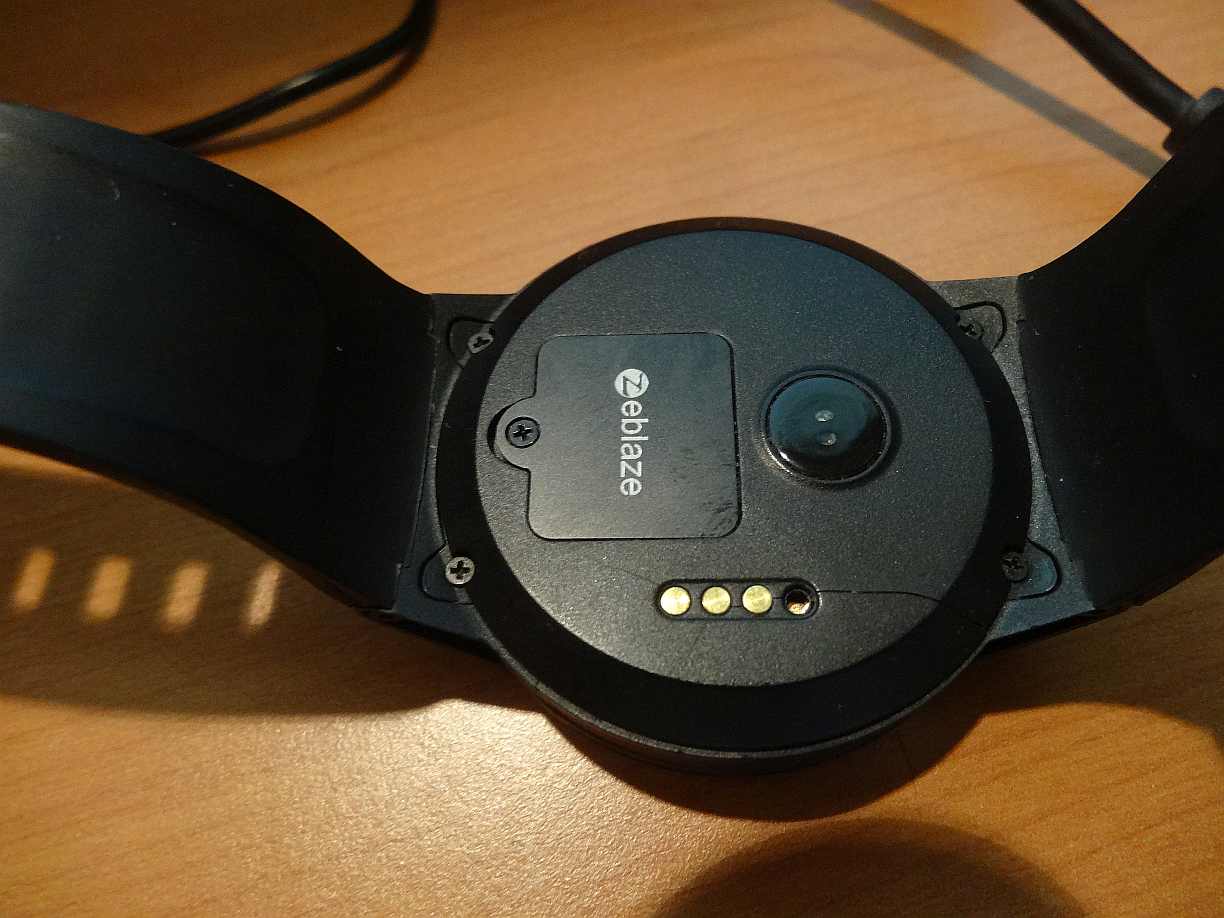
My replacement Thor 4 (which was replaced due to an issue with the microphone not functioning) has now died in the arse because the backing plate has split and a charging connector has fallen out!
I can only assume substandard plastic materials cracking from the heat / cool cycle of charging? or the battery expanded? Anyway here is a youtube clip which BangGood made me make but just skip to the end to see the back of the watch
Sept 27, 2018 4:23:32 GMT 1aeger said: My replacement Thor 4 (which was replaced due to an issue with the microphone not functioning) has now died in the arse because the backing plate has split and a charging connector has fallen out!
I can only assume substandard plastic materials cracking from the heat / cool cycle of charging? or the battery expanded? Anyway here is a youtube clip which BangGood made me make but just skip to the end to see the back of the watch
I will never learn I guess because unlike an Apple Watch which rarely fails physically, most of my past Chinese made Android smart watches stopped working after just a few months. (It's a real pain to mail it back to China for repairs/replacements why with all that waiting time both ways.) The buttons would fail or the screen would crack or the charging cable or the magnetic anodes would corrode.