@WildsideD
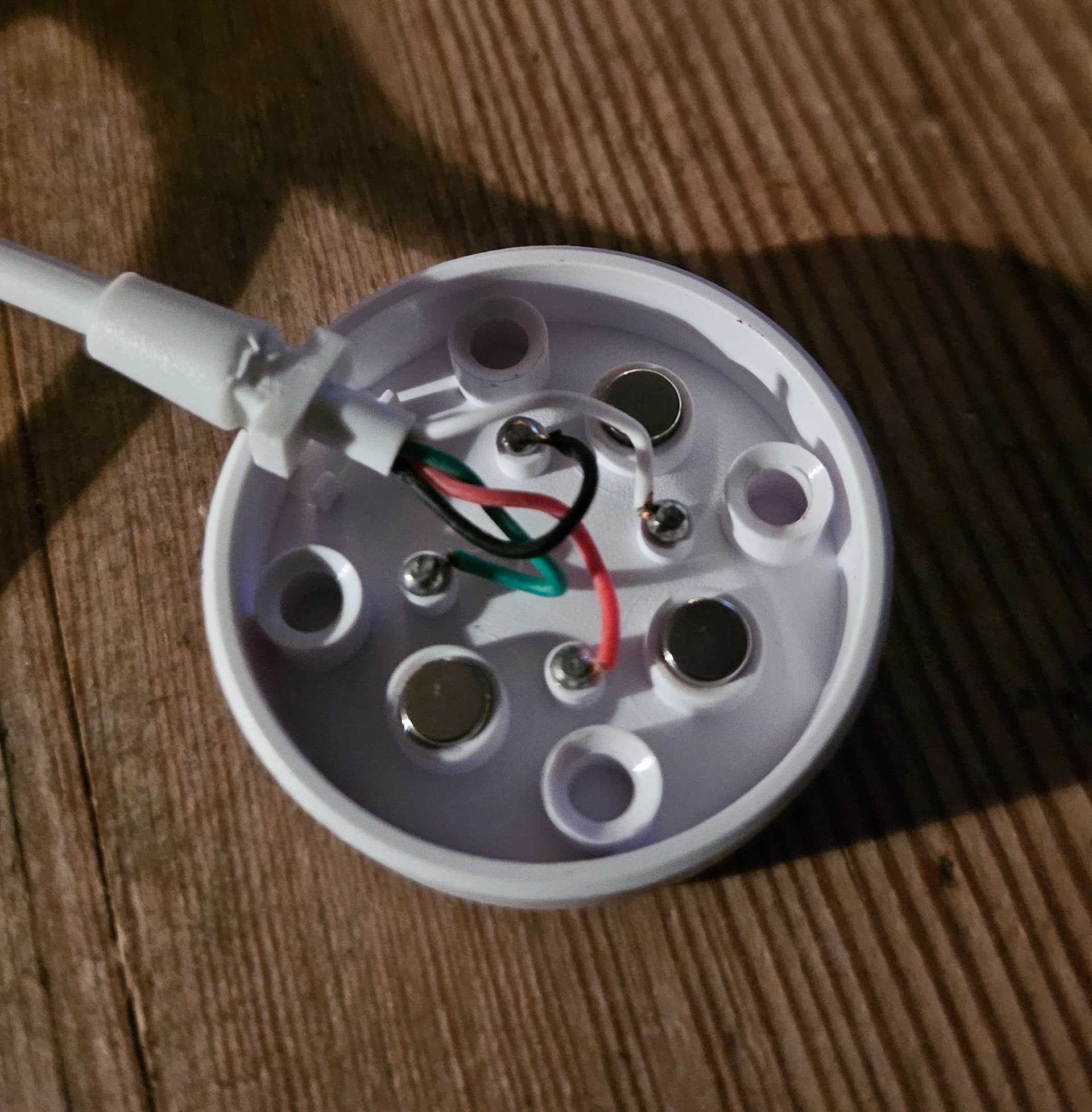
The two opposing magnets must be removed from the holder and reinserted in reverse. Then the metal pins are pushed out and wired as shown in the photo.
However, I will create a more detailed tutorial tomorrow.
6 Likes
Much obliged, good sir; this will be invaluable once the cable arrives. Might have a go at the remote ADB over the weekend to get Watch Droid working, as it would be nice to get texts forwarded over.
2 Likes
Two cameras? 2+9 mpx?
Where’s the second one? I only see a single, rotative camera on the right side.
How you deduce that hardware specs are fake even when hardware detection tools say you other words?
1 Like
Thanks @G1NT0N1C 
1 Like
Second camera is on the back of the watch.
Designed to be used as a standalone - watch off wrist and use as a camera.
It’s an interesting approach and some think it is controversial.
Matter of taste I guess.
I thought it was 0.3mp side and 5mp rear..
I will upload the spec sheet - ignore the ram and storage figures.
ASR_S13 (2).pdf (64.5 KB)
They are hard coded wrong and should be 3gb ram and 32gb storage. These are the correct figures.
3 Likes
When you send the command via adb it sometimes looks like nothing has happened. When actually it has and now works 
1 Like
hi, is there anyway we could get some kind of tutorial on wich apps to close permissions on to prolong the batterylife? i still have mine but do not use it as i cannot get more than 10 hours of batterylife, even in light-mode…i suppose it has to do with certain apps running in the background…in comparison, my m99 (A8) gets me 36 hours with everything on (gps,wifi,bluetooth and cell)
So you have a S13 ?
yess doc…had a vwar core 5…sold it a while back…and as i was bored rebought a s13 (much cheaper than the vwar core 5)….it’s only money..
1 Like
If you take a picture at max resolution, what’s the vertical and horizontal size of the file?
No problem . I get easily two days out of mine. Have you updated firmware and factory reset ? For me via adb removing bloatware is a good move.
2 Likes
yess,upgaded and factory reset….i’ll have a look at the pdf later in the day…thanx a bunch
do you use yours with bt,wifi,sim card and cell? or one of the above?
ideal for me is a bt connection whilst i am close to my phone, and the cell connection when i leave house without the phone…
ideally both on 24/7, as otherwise i forget to switch on and off
wifi can stay off for me, as i use only when installing apps…for the rest the data comes from my sim wich has unrestricted data amount
i charged it fully at 12.30…left it next to my phone without using it, and we are now 2 hours later, and it has gone down to 73%, wothout using it, just incoming notifications…not good
I leave bt on and connected via watchdroid. Mobile data also always on
Gps / wifi off
i just made connection with bugjaeger thru wifi as i do not have the 4pin cable yet…it has worked
anyway of getting a list what can be safely uninstalled?
Since 4-pin cables for the S13 and Vwar core5 are nearly impossible to find (and if you do find them, they cost $18!), I’ve created a guide on how to make an $18 cable from an 89-cent DW89 cable.
I’ll add it to the main post also.
6 Likes
Brilliant. Great work mate
2 Likes
Thank you Doc. 
2 Likes
how to wireless debugging on Raserberry OS?
I don’t know, sorry. I can’t find anything in the net also.
1 Like
Hi everyone. I can’t make the WatchDroid app “appear on top of other apps”
adb
Exception occurred while executing ‘grant’:
java.lang.SecurityException: Package com.lumaticsoft.watchdroidassistant has not requested permission android.permission.SYSTEM_ALERT_WINDOW
at com.android.server.pm.permission.PermissionManagerServiceImpl.grantRuntimePermissionInternal(PermissionManagerServiceImpl.java:1404)
at com.android.server.pm.permission.PermissionManagerServiceImpl.grantRuntimePermission(PermissionManagerServiceImpl.java:1319)
at com.android.server.pm.permission.PermissionManagerService.grantRuntimePermission(PermissionManagerService.java:545)
at android.permission.PermissionManager.grantRuntimePermission(PermissionManager.java:597)
at com.android.server.pm.PackageManagerShellCommand.runGrantRevokePermission(PackageManagerShellCommand.java:2546)
at com.android.server.pm.PackageManagerShellCommand.onCommand(PackageManagerShellCommand.java:292)
at com.android.modules.utils.BasicShellCommandHandler.exec(BasicShellCommandHandler.java:97)
at android.os.ShellCommand.exec(ShellCommand.java:38)
at com.android.server.pm.PackageManagerService$IPackageManagerImpl.onShellCommand(PackageManagerService.java:6001)
at android.os.Binder.shellCommand(Binder.java:1049)
at android.os.Binder.onTransact(Binder.java:877)
at android.content.pm.IPackageManager$Stub.onTransact(IPackageManager.java:4313)
at com.android.server.pm.PackageManagerService$IPackageManagerImpl.onTransact(PackageManagerService.java:5985)
at android.os.Binder.execTransactInternal(Binder.java:1285)
at android.os.Binder.execTransact(Binder.java:1244)