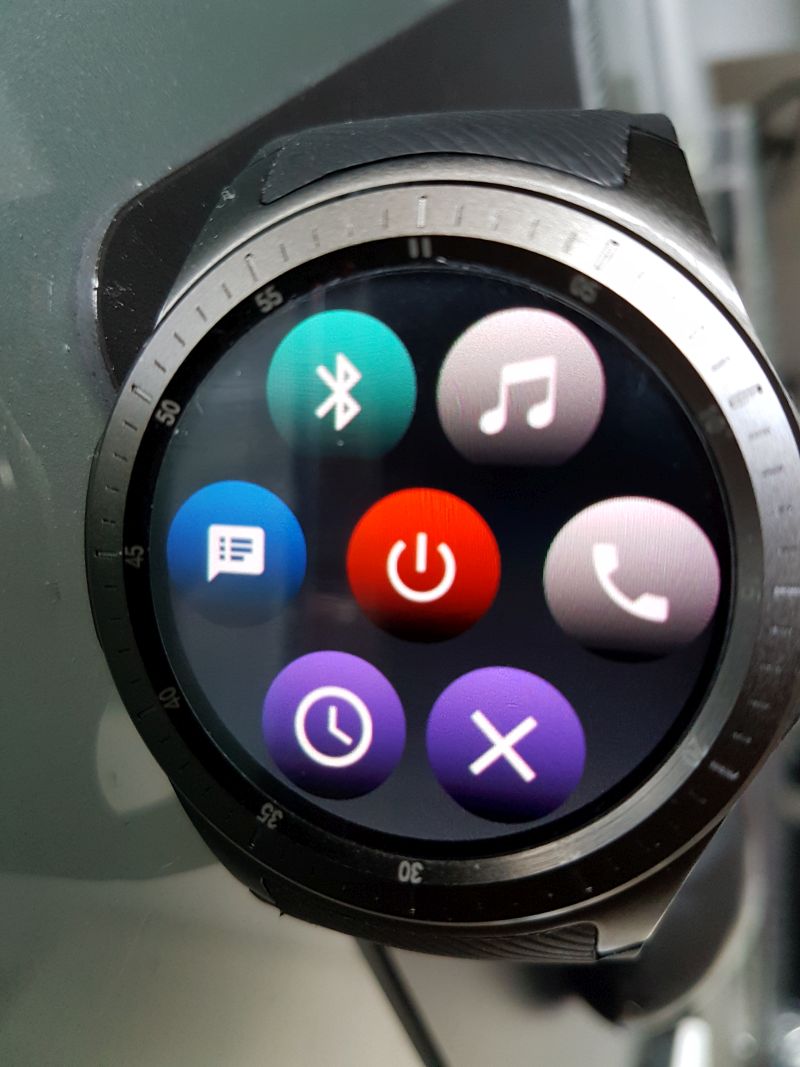
Where is such an option? Could anybody please describe.
I am using this wonderful app with universal launcher on my DM368 plus. Really annoying is that the apps runs on my watch always in the foreground. Raising the hand does not show the watchface. Only the running watch droid app.
Just throwing this out there, hope it helps. Try opening the Watch Droid App and select the X at the bottom. This should close the app, but not turn it off. Good Luck.
Where is such an option? Could anybody please describe.
I am using this wonderful app with universal launcher on my DM368 plus. Really annoying is that the apps runs on my watch always in the foreground. Raising the hand does not show the watchface. Only the running watch droid app.
Just throwing this out there, hope it helps. Try opening the Watch Droid App and select the X at the bottom. This should close the app, but not turn it off. Good Luck.
Try to uncheck the third option in the settings (app phone).
Thanks for this tip. Maybe it works on other watches. On my dm368 plus clothing the app with the X works only for a short time. After pressing X the Watchfaces open. But when the display shuts off after some seconds and I raise my wrist to activate the display again by gesture the watch Droid app pops up again in the front.
Nov 22, 2017 10:43:22 GMT 1slon1001 said: Thanks for this tip. Maybe it works on other watches. On my dm368 plus clothing the app with the X works only for a short time. After pressing X the Watchfaces open. But when the display shuts off after some seconds and I raise my wrist to activate the display again by gesture the watch Droid app pops up again in the front.
Works on your watch for sure!
Uncheck the third option in the settings (app phone).
Thanks for supporting me with my problem. I attached a picture from my dm368 where is in my understanding the option setting area of the app watch droid. There in lower right corner I see the X.
Pressing this app does not work.
What do you mean exactly with “Uncheck the third option in the settings (app phone).”.
Dec 24, 2017 10:33:18 GMT 1gmember78 said: Strange, even with this option unchecked i still get the app homescreen instead of the watch face after a notification.
Already contacted the developer with a video.
Running on a kw88
true, drove me crazy also and actually loved the m2d more cos i can use it over 3g.
Has anyone else experienced frustration trying to pair the watch and phone with watchdroid?
I got my Allcall W1 yesterday, and am quite sure (due to other things I’ve already done) that the bluetooth is working, and that my phone can see and pair with it generally.
However when I try to set up Watch Droid, I have two problems:
If I try to select my watch from the list of bluetooth devices (which is one of the pairing options), it just fails to connect, retries, fails again for as long as I want to sit there and watch it.
If I try to use the QR code, it seems to ignore my QR reader app on my phone (which CAN read the QR code from my watch) and instead uses its own QR reader, which cannot read the QR code - or I’m not using the reader correctly. It never automatically parses the code, and there doesn’t seem to be a button to force it to. I’m also slightly confused because the QR code reader it’s using seems to be thinking it’s going to read a VIN.
QR Reader issue was my fault. I forgot I’d installed the VIN scanner in the past, and for some reason watch droid was launching it as QR reader. However, although a proper reader is now reading the code, it still won’t connect to my watch.
Aug 17, 2017 8:47:00 GMT 1pafka024 said: I have been using it for one week with KW88. It seems reliable and battery life is same as with M2D. We will see after more days of usage.
Is there an app to send files from the Smartphone to the watch with Bluetooth automatically if there is a new one in a folder?
I would like to have WhatsApp Images, Videos, documents, voice Messages, audios from the Phone to the watch sending if there is a new one in the WhatsApp folders.
There are apps that sync folders to cloud storage, but you must have wifi or mobile data enabled on the watch, what is battery draining.
Like the full android watches could show all the content, the only way is to send it to the watch.
If this would implement to watch droid, that would also be fantastic.
Otherwise someone is knowing of such an app or can program this?
Aug 25, 2018 9:13:35 GMT 1alt68 said: Yes.
Like you have Dropbox on your Computer.
If there is a new file in the cloud, it will be synced and downloaded to all Devices.
But i only need if there is a new file in my WhatsApp folder on my Phone than sync it with Bluetooth on my smartwatch in a folder there.
why not use dropbox on your watch? or google driver? or microsoft’s one? or samsung one’s? i use all of them to have backups in more than one place:)