8 have the device completely open see permissive avb verity disabled root and magisk an bootloader unlocked with mtk client I can flash anything I’ve had a port running already of Twrp
but I’m building an absolute working version and I’ve had a gsi flashed what you mean how
Brom always hits perfect for me if I have the mtk client sitting with command ran and have the device off and plug in from off it will connect .. You don’t need to be connected to run the command. I run the command then connect and it flashes I usually have it connected to the magnetic end then just have to plug in USB. But now I use Linux Windows the USB can be tricky cuz of vcom drivers I’ll gladly give out my email anyone need help with anything watch related. Be.rt.pittman76@ gmail any time I’ll help all I can I have a new thread up now that has a protocol to build two fully functioning but if have to say the learning curve is tremendous. Is extremely advanced. I’d say it’s the ore to some future deterministical analytical twrp builder with ai. But I started it I’m good with that
1 Like
Wow so you might wanna keep your eyes out on my xda thread I’ll be dropping a very nice twrp build sometime this week I’m thinking by fri april 17 2026
1 Like
Just wanting to put my twrp build out there it’s not completed but will
L be soon it’s booting and safe to flash and test I take no responsibility for those who flash without experience. I will help anyone though just get at me here xda my GitHub or telegram which I’ll be linking here
Primary repository for forensic-grade Android development. Focused on technical sovereignty and hardware autonomy#Lokmat5Max #MT6762 #HelioP22 twrp #AndroidWear #Mediatek root #Bootloader firmware #AndroidDevelopment
You can get to my repository and recovery and source through telegram too
2 Likes
Let’s keep this stuff together in the same thread.
Thanks
1 Like
I’m gonna drop one off my finding I found code on the stopwatch.apk that basically would give any app that knows how to use it complete root user access or anything on the device, I actually am reporting it waiting on my cve id right now
3 Likes
we have same on ASR watch
1 Like
We have same on almost all Android watches that use in-house custom apps.
This is the problem with these “custom in-house” Android apps made to keep various brands happy. I’m sure that if the regular AOSP apps were included correctly and “per function” apps were built correctly, we would not see these problems. But the brands will not budge…. So far.
It’s nothing to do with the main OEM, this is purely brand pressure for firmware that they want. If OEM refuses to accommodate them, they will go elsewhere. So it’s a vicious circle. Always has been.
The sad truth is that you can easily see that far too many and unnecessary permissions have also been assigned to them. Basically just lazy work.
Rather than done correctly and per function requirements, they seem to just dish out full permissions to all apps. It’s a real problem and needs to stop before someone has a breach.
In my opinion.
2 Likes
i really hope we can find one in mimu system so it can be used to activate adb
is a good thing we always want more permission then less you should be happy to have one click root
1 Like
Good for us maybe, but bad for the OEM.
1 Like
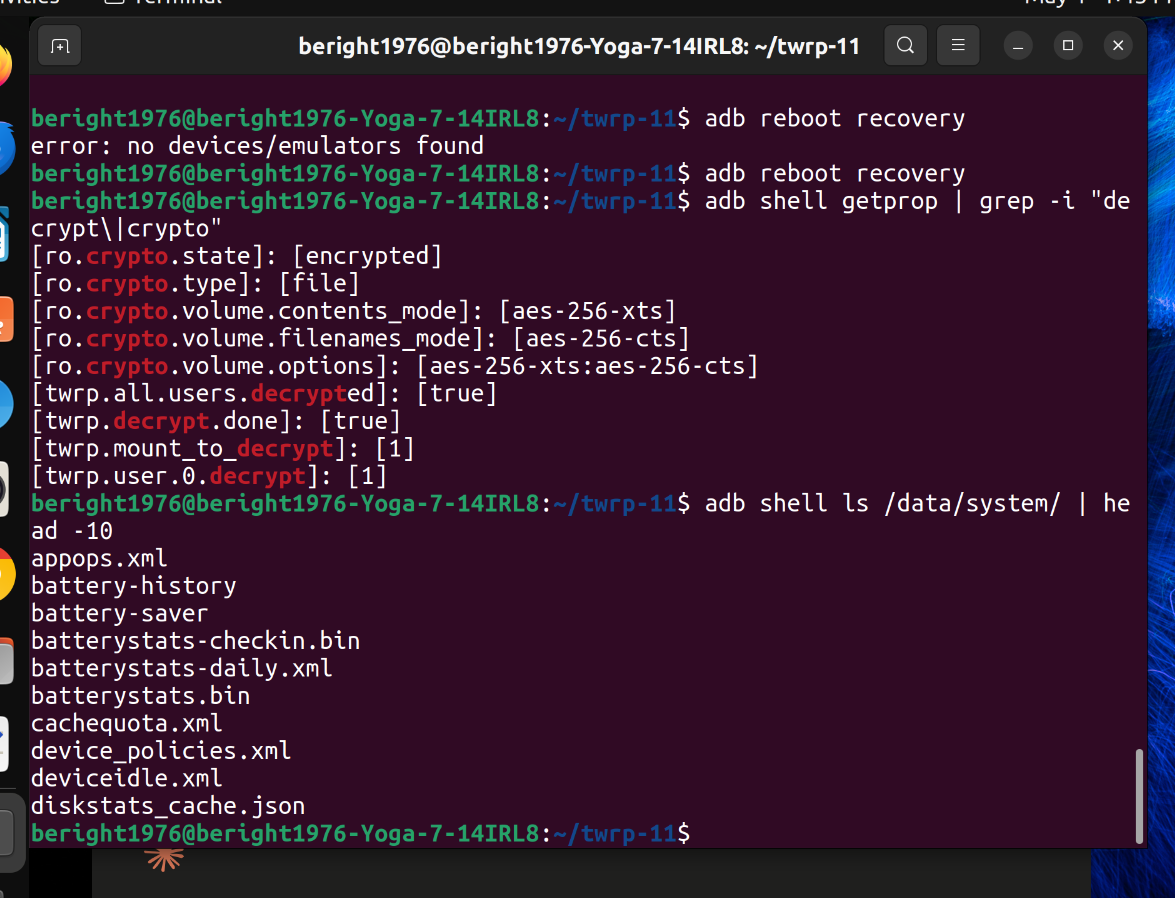
I should have a fully functioning fbe decrypting twrp bby the end of the week it’s already booting I have a few errors I have to work through but all the main parts are there. I knew this was going to be a lot more complex than I initially intended it has turned into a full reverse engineering of the entire device . But by time I done I’ll be able to build something vanilla for the rom and I will build a clean implementation of the sensor stack for aosp and get rid of their oem apps
3 Likes
Well done. 
Nice work. I let the OEM guys know about the stopwatch app. Hopefully they won’t use it again. Definitely a good idea to get rid of all the custom OEM apps. That’s exactly how we made the Android 10 version we released here.
Much cleaner and secure experience.
Thanks
1 Like
i wanted to throw up a lil bit of my secret sauce this was likely the most complex build ive evr seen done so i wanted to you know let everyone check it out and give anyone who is a good developer something to think about
ARCHITECTURAL WHITE PAPER: Defeating the MTK “Franken-SoC”
Project: LOKMAT APPLLP 5 MAX (C17S) | TWRP 11 / Android 10 Decryption
Lead Engineer: Bert
Status: 100% FBE Decryption Achieved (Zero Hardware TEE Reliance)
THE PREMISE
The modern standard for TWRP development is “compile-and-pray.” Developers throw vendor blobs into a tree, compile, read the recovery.log, and patch whatever segfaults.
That fails completely on the LOKMAT C17S. The OEM (Topwise/Linswear) built a “Franken-SoC”—an MT6762 physical chip running an MT6765 software HAL, utilizing an Android 10 VNDK, but heavily customized to bridge a secondary nRF52832 smartwatch coprocessor. To achieve FBE decryption on a TWRP 11 base, we had to abandon standard tree-building and engineer a custom, root-level cryptographic containment system.
Here is the architectural blueprint of how we broke the board.
1. THE CROWN JEWEL: The “Crypto Isolation Bubble”
The Problem: Dropping Android 10 MTK proprietary Keymaster/Gatekeeper blobs into an Android 11 TWRP environment causes an immediate SIGSEGV (Signal 11) crash in the property tree. The legacy vendor blobs collide fatally with the Android 11 Bionic linker and property service.
The Solution: We engineered a root-level containment zone (/crypto_isolation/).
-
The Bionic Eviction: We mapped 31+ proprietary dependencies from live RAM, placed them in the bubble, and surgically evicted the Android 10 Bionic core (libc.so, libdl.so, libm.so).
-
The Result: By forcing the Android 10 crypto blobs to fall back on the TWRP 11 Bionic stack for system property access, while using the isolated Android 10 Truth Set for crypto logic, we achieved absolute stability. Keymaster 4.0 runs as root, isolated, and sleeps perfectly in the binder loop.
2. SHATTERING THE TREBLE NAMESPACE WALL
The Problem: Gatekeeper relies on hw_get_module(), which is hardcoded to look only in /vendor/lib64/hw/. If you use symlinks to point it to the Isolation Bubble, the Android 11 linker (libvndksupport.so) detects a Treble boundary violation (leaving the sphal namespace) and aborts the HAL with a Signal 6.
The Solution: The VFS Bind Mount Strike.
-
Instead of symlinks, we utilized the Kernel Virtual File System. We injected a native init.rc command: mount none /crypto_isolation/hw /vendor/lib64/hw bind.
-
The Result: We projected a “hologram” of our bubble into the vendor partition. The strict Android 11 linker inspects the path, sees a valid /vendor directory, and steps aside. Gatekeeper loads its implementation flawlessly without ever actually leaving the isolation cage. (Combined with patchelf DT_RUNPATH injection to maintain internal dependency mapping).
3. THE VINTF MANIFEST BOOT-STRIKE
The Problem: TWRP 11’s build system automatically generates a manifest.xml declaring 30. The device’s legacy Android 10 hwservicemanager cannot parse this tag, panics, and enters a fail-safe mode where it refuses to register any HALs, killing Keymaster instantly.
The Solution: Brute-force init override.
-
We compiled a pristine, stripped-down Android 10 XML manifest into the ramdisk root.
-
Using init.rc, we overwrite both TWRP-generated manifests (/system/etc/vintf/manifest.xml and /system/manifest.xml) milliseconds before hwservicemanager initializes.
-
The Result: The service manager wakes up, reads a clean Android 10 manifest, and opens the binder router. Keymaster and Gatekeeper register successfully.
4. BYPASSING THE OEM DECOY PARTITION
The Problem: Standard MTK Android 10 devices store FBE keys in the /metadata partition. TWRP’s vold looks there by default. However, this OEM utilized a decoy.
The Solution: Live Block Mapping.
-
The OEM partition generator created a physical metadata partition (mmcblk0p11), but it is completely empty. The actual FBE keys are stored on the legacy md_udc partition (mmcblk0p10), which the stock fstab deceptively mounts to the /metadata path.
-
The Result: By ignoring the partition labels and natively mounting md_udc to /metadata via init, we bypassed the decoy and fed vold the raw encryption keys it needed.
5. THE HYBRID FSTAB ARCHITECTURE
The Problem: TWRP’s crypto initialization relies on the AOSP libfs_mgr binary to read /etc/recovery.fstab and detect the fileencryption=aes-256-xts flag. However, libfs_mgr crashes the moment it reads TWRP-specific syntax (like flags=display=“System”;logical).
The Solution: Top-Down Hybrid Formatting.
-
We restructured the recovery.fstab so that the pure, 5-column AOSP crypto entries (/metadata, /data, /cache) are at the absolute top of the file.
-
The Result: libfs_mgr reads the crypto flags and initializes FBE before it hits the TWRP logical partition flags and aborts. TWRP triggers the decrypt prompt seamlessly.
6. THE PREEMPTIVE USB STRIKE
The Problem: The device utilizes a premium nRF52832 coprocessor for smartwatch health metrics. The wiite_corp kernel driver takes exactly 7.26 seconds to handshake with this chip over UART/I2C during boot, completely locking the CPU. This hang causes the host PC to drop the ADB connection.
The Solution: Early-init PID locking.
-
We preemptively initialized the musb-hdrc USB Gadget in early-init, rigidly locking the PID to 0x201D.
-
The Result: ADB comes up instantly and survives the 7-second kernel hang without dropping the connection.
CONCLUSION
This implementation proves that when dealing with heavily customized, closed-source MediaTek BSPs, standard TWRP tree-building is obsolete. By utilizing dynamic linker tracing, VFS bind mounts, and root-level Bionic-evicted isolation bubbles, we can force modern TWRP environments to perfectly execute legacy proprietary crypto binaries.
The vault is open.
3 Likes
Hi @berite1976
Did you get the APPLLP 9 by any chance? The A15 watch just released?
2 Likes
i have done s lot of work on the lokmat 5 over the past few months since ive been around last . ive got the new device on the way . if you are going to be supporting this watch you should probably look at my work . https://xdaforums.com/t/r-d-mt6762-mt6765-lokmat-appllp-5-max-c17s-reverse-engineering-security-analysis-and-platform-remediation.4803106/
2 Likes